


NIV Bible version, Offline app
4.84.23K Reviews
App Specs
- Version
- 1.65
- Updated On
- License
- Free
- Downloads
- 1,000,000+
- Developer
- Mobile Bible apps
- Categories
- Books & Reference
- Platform
- Android
Screenshots
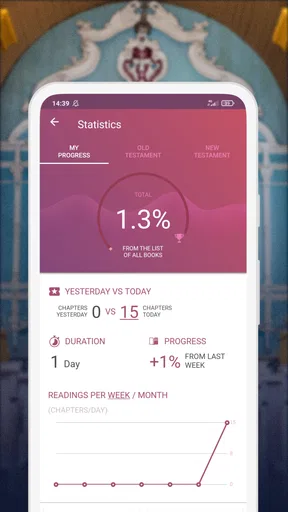
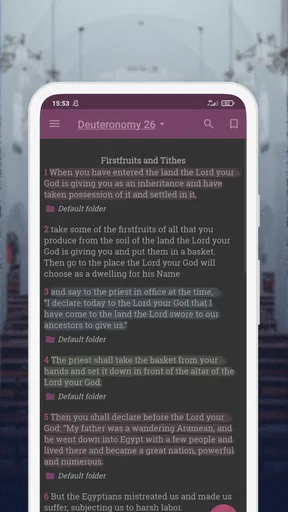
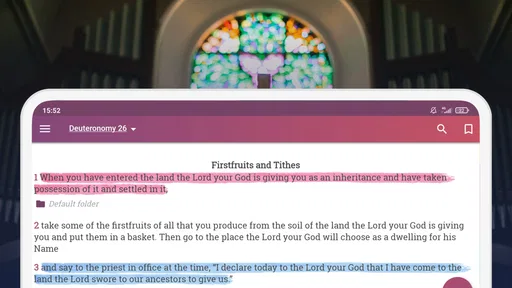
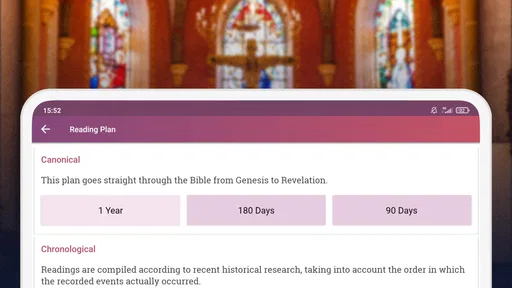
 Analysis by AppCompare
I tend to judge a Bible app by how well it fits into ordinary life: can I get to a passage quickly, read comfortably on a small screen, and pick up again when a day gets interrupted? NIV Bible version, Offline is a free Bible and reference app from Mobile Bible apps, built around the New International Version. It has a 4.8 average from around 46,000 ratings, and more than a million installs. Those figures suggest a well-used app, but what matters most to me is whether its reading tools suit the way you actually use scripture.
When the connection is part of the experience
The name may set an expectation of reading without a network, but I wouldn’t plan a trip around that assumption. Connectivity can affect practical moments such as installing the app, receiving updates, or using any online-dependent part of the experience. If you want a Bible app specifically for a flight, a remote cabin, or a commute through coverage gaps, check what content is available offline while you have a reliable connection, then test it before you leave. That small check is more useful than discovering a limitation when you are already without service.
For regular reading at home, the connection question may barely matter. For a study group, it matters more: you may want to search for a passage while people are waiting, and a slow network can make a quick lookup feel less immediate. I’d open the app and try the exact task you expect to do—finding a passage, opening a saved note, or listening—rather than assuming every part behaves the same way.
How it fits into a phone-sized routine
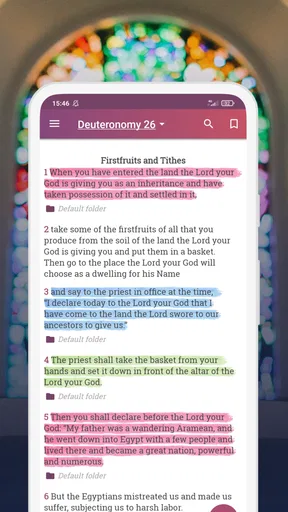
A Bible app is most useful when it lowers the effort of returning to a passage. The original reading tools described here—highlighting, bookmarks, notes, keyword search, adjustable text, and a night setting—point toward several distinct routines. I would use a bookmark for a chapter I plan to continue later, a highlight for a line I want to notice again, and a note for a question or personal reflection. Keeping those jobs separate makes saved material easier to revisit than treating every useful passage the same way.
There is also a practical distinction between a brief daily reading and a longer study session. A reminder can help establish a regular moment, but a notification is only a prompt; it does not make the reading itself more meaningful. If reminders interrupt work or family time, I’d choose a predictable quiet period instead. For longer sessions, increasing the font before you begin and using the night setting when appropriate can reduce fiddling once your attention is on the text.
What to do when reading is interrupted
Phones are easy to put away in the middle of a passage, so I like a workflow that makes returning simple. Before switching to another task, I’d bookmark the place or leave a short note about the question I was considering. That is especially helpful if you read in small gaps—during a lunch break, while waiting for an appointment, or between errands—rather than in one long sitting.
If the app behaves unexpectedly, first separate a connection problem from a reading problem. A search or update that depends on the network may respond differently from a passage already open on the screen. Reconnecting and reopening the relevant section is a sensible first step; if you depend on access away from home, verify the behavior in advance. I would also avoid making the app the only place for reflections that matter to me: a personal note can be useful, but keeping important study thoughts somewhere else as well is a prudent habit.
Worth Reading Before You Choose

EA SPORTS FC Mobile 26 Is a Bigger Football Game, but It Takes Time

Flipboard Shows What News Apps Must Do Beyond the Feed

Switching to Android Auto Means Rethinking Your Driving Routine

Google Calendar Makes a Crowded Week Easier to Manage

Ludo King Makes the Most of the Minutes Between Plans

Baby Panda World Brings Quick Play to Modern Phones, but Its Game Library Feels Busy
Data-conscious choices and version details
When I’m trying to limit mobile data, I avoid starting updates or other network-heavy tasks until I’m on Wi-Fi. I also test the app’s reading workflow before relying on it in a low-signal place, because “a Bible app on my phone” and “every part works without a connection” are not automatically the same promise. If you use audio, check that it is available in the situation you have in mind; the app’s focus includes NIV audio, but the way that listening depends on connectivity can shape whether it suits your routine.
The app is free to install, with in-app purchases listed at $8.99 per item. It is rated for Everyone, and version 1.64 requires Android 7.0 or later. If you are choosing for a child or a family device, those basics help establish whether it is suitable and compatible, while the actual reading habits and purchase settings still deserve your attention.
Its 4.8 average across around 46,000 ratings and roughly 4,100 reviews is reassuring context, not a guarantee that every feature will match your expectations. I’d treat the app as a focused NIV reading option rather than a universal study library. A printed Bible avoids battery and network concerns; a broader reference app may be a better fit if you need several translations or extensive study resources. The trade-off is convenience: a phone makes it easy to carry a passage and your own reading routine together.
Ever found yourself in a spot where you wished you could read the Bible without needing an internet connection? Well, the NIV Bible version, Offline app is here to save the day. As someone who loves exploring apps, I dove into this one to see what it brings to the table, and let me tell you, it's quite the companion for spiritual journeys.
First Impressions
Upon installing the NIV Bible version, Offline app, the first thing that catches your eye is its user-friendly interface. It's clean, intuitive, and honestly, a breeze to navigate. Whether you’re tech-savvy or not, finding your way around won't feel like solving a Rubik's cube.
One feature that stands out immediately is the offline mode. Imagine being on a camping trip, far from Wi-Fi, and still having access to your favorite scriptures. It’s like carrying a pocket-sized library wherever you go. Pretty neat, right?
Diving into Features
Now, let's talk features. The app isn't just about reading the Bible; it’s about enhancing your reading experience. It includes options to highlight verses, bookmark pages, and even add personal notes. This makes it super easy to track your thoughts or revisit passages that resonate with you.
Another gem is the search functionality. Looking for a specific verse or topic? Just type in a keyword and voilà, it’s at your fingertips. This is especially handy when you’re in a study session or preparing for a discussion group.
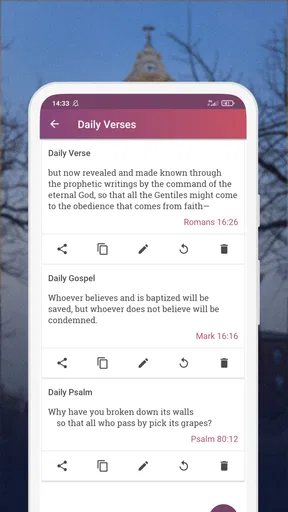
Let’s not forget the daily verse feature. It’s like having a little divine wisdom delivered to you each day. You can even set reminders so you don't miss out on your daily dose of inspiration. For someone like me who can be a tad forgetful, this is a godsend (pun intended).
User Experience and Personal Touches
One thing I particularly appreciate about this app is the customization options. From font sizes to background colors, you can tweak the settings to suit your reading comfort. This might sound trivial, but it’s these little touches that make prolonged reading sessions so much more enjoyable.
Plus, the night mode is a blessing for late-night readers. It’s easy on the eyes and ensures you can read without disturbing others around you. Trust me, your sleeping partner will thank you!
Performance and Reliability
Now, onto performance. The app runs smoothly without any hiccups. No annoying lags or crashes, which is always a relief. And since it’s offline, you're not at the mercy of fluctuating internet speeds. This reliability is crucial, especially when you’re in the middle of a deep reading session.
One might wonder about updates since it's offline. Not to worry, the app does update when you connect to the internet, ensuring you have the latest features and bug fixes. So, it’s the best of both worlds!
Final Thoughts
So, is the NIV Bible version, Offline app worth downloading? In my book (or app), it’s a resounding yes. It combines functionality with convenience, making it an ideal tool for anyone looking to keep the Word close, no matter where life takes them.
With its array of features tailored for both casual readers and serious scholars, this app offers something for everyone. Whether you’re on a spiritual journey or simply enjoy the peace that comes from reading scripture, it’s like having a little piece of tranquility right on your phone.
So, why wait? Dive into this app and let it accompany you on your path of discovery and reflection. Happy reading!
Who will get the most from it
I think this app makes the most sense for someone who already prefers the NIV and wants a convenient way to return to familiar passages throughout the day. A reader who likes marking a verse, jotting down a thought, and finding it later can build a simple personal study habit without carrying a separate notebook. It can also suit someone preparing a short reading for a group, provided they test search and access in the place where they plan to use it.
For example, I might read a few verses over breakfast, bookmark the section before leaving, then return to it during a break and add a note about something I want to ask at a discussion group. That is a more realistic use than expecting a phone app to replace a full study desk. Its value is in making small moments available for reading, not in turning every spare minute into a task.
Where another option may work better
If you compare it with a printed NIV Bible, the phone version is easier to carry and offers search and personal annotations, while paper needs no battery and is unaffected by signal. If you compare it with a general Bible reference app, this one’s appeal is its focused NIV experience; readers who regularly compare translations, consult extensive commentary, or build a detailed cross-reference study may prefer a broader tool. I would choose according to the work I actually do, not the number of features an app claims to offer.
It may also be the wrong fit if you want a completely distraction-free reading space. A phone can pull attention toward messages and other apps, and adjusting a screen does not remove that interruption. In that case, a printed copy or a dedicated reading routine with notifications silenced may help more. Similarly, anyone who needs guaranteed access in a no-service location should verify offline behavior first rather than relying on the app’s name.
A few habits that make it more useful
I would keep notes concise and searchable in purpose: record a question, a connection to another passage, or a thought worth revisiting rather than writing a full journal entry in every note field. Bookmarks work better as “return here” markers, while highlights show what stood out on the page. This modest system prevents saved items from becoming a pile of marks with no clear reason behind them.
Search is most helpful when I know a distinctive word or phrase, but I would not treat a keyword result as a substitute for reading its surrounding passage. Open the verses around a match and consider the context before using it in a conversation or study. That is particularly useful when a word appears in several places or when you are preparing to explain why a passage matters.
For listening, I would decide in advance whether audio is central to my routine or just an occasional option. A commute can be a useful listening window, but noisy surroundings and changing connectivity may make reading a better choice. Trying both modes in the settings where you actually spend time will tell you more than choosing based on the feature label alone.
My connectivity verdict
Connectivity is not the reason I would recommend this app to everyone; the stronger case is its straightforward NIV reading setup, personal annotations, and handy search. The network matters around updates and any task that relies on an online connection, so I would prepare before travelling, conserve mobile data by postponing updates until Wi-Fi, and test the passages or audio I need ahead of time. That is a sensible routine for a phone-based Bible, not a drawback unique to this one.
For readers who want a familiar translation within reach and are comfortable treating the phone as a reading tool, NIV Bible version, Offline is an appealing free starting point. I would still choose a print Bible for dependable access without charging or troubleshooting, and a broader reference app for intensive comparative study. If your needs are closer to daily reading, brief study, and returning to saved passages, this app is worth trying—with offline expectations checked before you depend on it.
Pros
- Offline access without internet required.
- User-friendly interface for easy navigation.
- Comprehensive search feature for quick references.
- Daily verse feature for inspiration.
- Bookmarking and note-taking capabilities.
Cons
- Contains ads that may interrupt reading.
- Limited customization for text appearance.
- Some features require in-app purchases.
- Occasional lag in loading chapters.
- Audio version not available for all books.
FAQs for NIV Bible version, Offline app
Is the NIV Bible Version app truly offline?
Yes, the NIV Bible Version app is designed to be fully functional offline. Once downloaded, you can access all the features, including reading and searching scriptures, without needing an internet connection. This makes it ideal for users who want to study the Bible in areas with limited connectivity.
What features are available in the NIV Bible Version app?
The app offers a range of features including offline access to the full text of the NIV Bible, search functionality, bookmarks, notes, and daily verse notifications. It also includes audio support, allowing users to listen to the Bible, which can enhance the study experience.
Does the app include advertisements or in-app purchases?
The NIV Bible Version app may include some advertisements to support its free version. However, there might be an option to remove ads through a one-time purchase or subscription. Additionally, some premium features or study materials could require in-app purchases.
Can I customize the reading experience in the app?
Yes, the app allows for customization to enhance your reading experience. Users can adjust font size, switch to night mode for easier reading in low light, and choose from various themes. These features help tailor the app to individual preferences, making Bible study more comfortable.
How can I share verses from the NIV Bible Version app?
Sharing verses from the app is straightforward. You can easily share passages via social media, email, or text message directly from the app. Simply select the verse you want to share, and choose the desired platform to connect with friends or family, spreading inspiration effortlessly.


